
Help Center › Set up your site
Sync calendars with iCal
Where to find the fields
Go to Listings, open a listing for editing, and scroll to the section Rental Specifics. This section appears only on listings in a rental category.
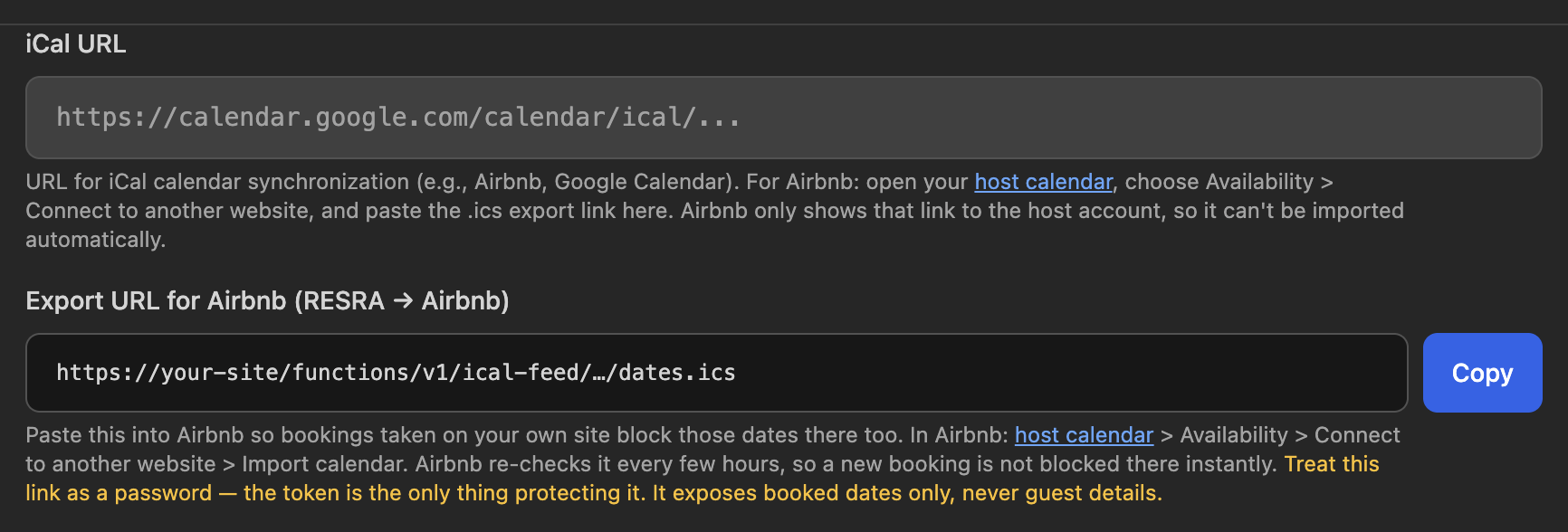
Step 1: send your direct bookings to Airbnb
- In Rental Specifics, find Export URL for Airbnb (RESRA → Airbnb) and press Copy. On a brand new listing, save it first. The link is created per listing.
- In Airbnb, open your host calendar, choose Availability, then Connect to another website, then Import calendar.
- Paste the link, give it a name such as "My website", and save.
From then on, every booking and block on your RESRA calendar shows up in Airbnb as unavailable. Airbnb receives dates only, never guest names or details.
Airbnb checks this link every few hours, not instantly. For a short window after a direct booking, the same nights can still be booked on Airbnb. If you take a direct booking for dates close at hand, block them in Airbnb by hand right away.
Treat the export link like a password. Anyone who has it can see which nights are taken.
Step 2: let RESRA see your Airbnb reservations
- In Airbnb, open your host calendar, choose Availability, then Connect to another website, and copy the export link. It ends in
.ics. - In RESRA, paste it into the iCal URL field in Rental Specifics.
- Press Update Listing.
Each listing takes one link. The field also accepts other calendars that publish an iCal link, such as Google Calendar.
Seeing Airbnb reservations on your calendar
Open the Calendar tab and pick a listing in Select a Listing. Airbnb reservations appear in red with an External badge. With no listing selected, the calendar shows your own events for all listings and no Airbnb ones.
- RESRA reads the Airbnb calendar fresh every time you open or change the calendar view. There is no sync button because there is nothing to wait for. Reloading the calendar is the refresh.
- Airbnb does not publish guest names in its calendar. You will see "Reserved", the reservation code and the last four digits of the guest's phone.
- Nights you blocked in Airbnb show as "Blocked on Airbnb".
- External events cannot be edited in RESRA. Change them in Airbnb.
How this protects you from double bookings
When a guest asks to book on your site and you press Review & Book in the notification email, RESRA checks the dates against both your own calendar and the live Airbnb calendar before it lets you create the booking. See Handle a booking request.
Bookings you add by hand are not checked. If you create a booking directly on the calendar, RESRA does not warn you about an overlap. Select the listing and look at the dates first.
If the Airbnb calendar will not load
Messages that start with "Failed to fetch iCal events" almost always mean the link is wrong or Airbnb was slow to answer. Copy the export link from Airbnb again, paste it fresh, save, and reload the calendar. If you see "The Airbnb calendar feed could not be checked" while reviewing a request, confirm the dates in Airbnb yourself before taking payment.
Related: Handle a booking request · Import an Airbnb listing
Still stuck? Email us.