
Help Center › Set up your site
Import an Airbnb listing
New listing? Set it up on Airbnb first. If you also list on Airbnb, create the listing there before you add it to RESRA. Airbnb's editor walks you through photos, amenities and the description, and the import then brings all of that across in one step.
Import one listing (recommended)
- Sign in to your RESRA admin dashboard (your site's address followed by
/login). - Go to the Listings tab and click Add Listing. To refresh a listing you already have, open it for editing instead.
- At the top of the form, find the box labelled Import from Airbnb.
- Copy your listing's public link. It looks like
airbnb.com/rooms/12345678. If you cannot find it, log in to Airbnb, go to Listings, open the listing, click Preview listing, and copy the link from the address bar. - Paste it into the box and press Import.
- A green message lists what came in. Read through the form and fix what needs fixing. On a new listing the import also fills Listing Type (your rental type) and Slug (the web address). Add your own Listing ID, set the nightly price, then press Create Listing (or Update Listing).
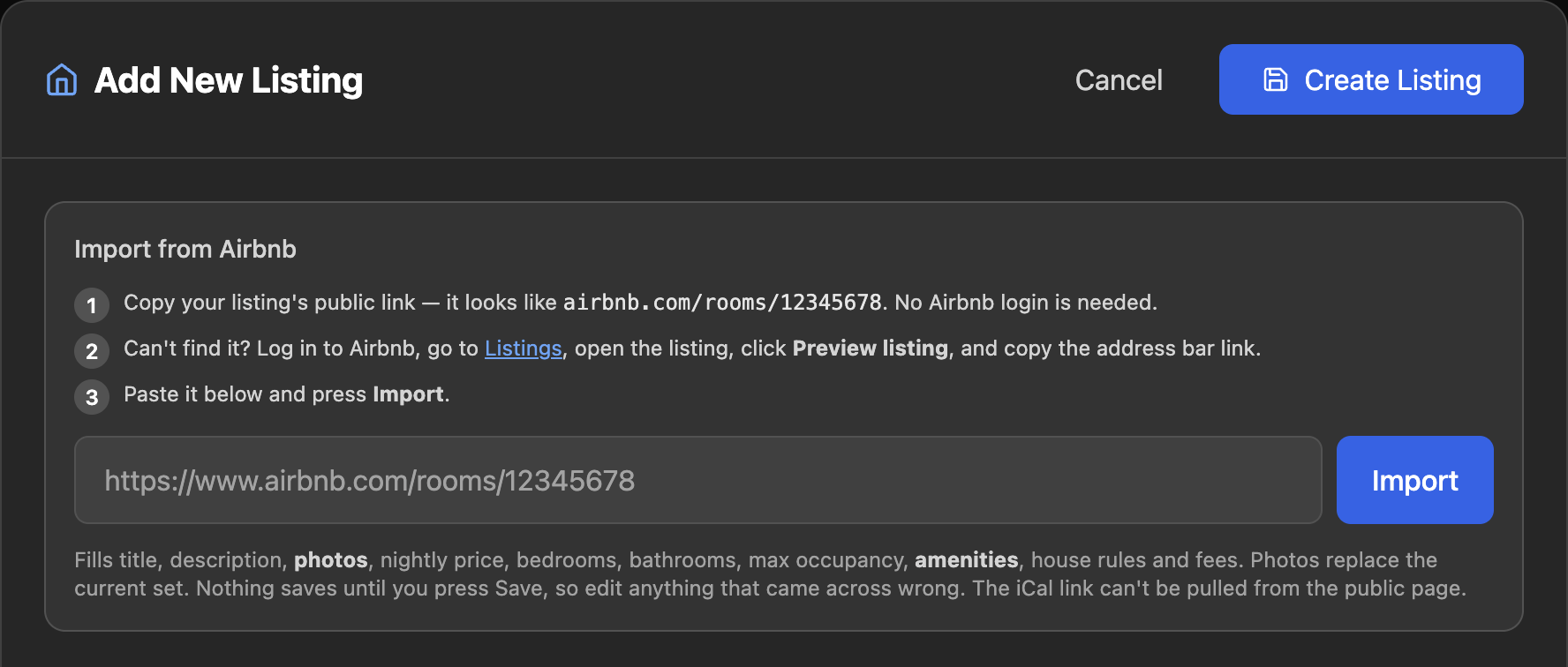
Use the public link, not a host dashboard link. The import reads the first long number it finds in what you paste. A link copied from your hosting dashboard can contain other numbers and pull the wrong listing.
Or let RESRA AI do it
The assistant (Claude, the AI model from Anthropic; see Your AI assistant) can do the whole import for you and write a draft.
- Click the sun button to open RESRA AI.
- Paste your Airbnb link in the chat and ask it to create a draft, for example: Create a draft listing from this Airbnb link: airbnb.com/rooms/12345678
- It reads the public listing and your existing listings, then creates the draft: title, description, photos and amenities. It also tells you what it could not find and any values it suggested, such as a price based on your other listings. Check those.
- Click Review & publish. The draft opens in the listing form with Status set to Draft (not on your site) and a temporary Listing ID starting with
DRAFT-. - Replace the Listing ID with your own, set Status to Active, and press Update Listing.
The assistant never publishes on its own. A draft stays off your site until you set it to Active and save.
What comes in, and what does not
Imported
- Title and description
- Photos with captions
- Amenities (only the ones Airbnb marks as available)
- Property type
- Bedrooms or bathrooms
Only when Airbnb's page shows them
- Nightly price
- Max occupancy
- House rules and guest safety
- Cancellation policy
- Cleaning fee and pet fee
Not imported
- Your iCal calendar link
- Your house manual
- The full safety descriptions
- Reviews
The middle list depends on what Airbnb puts on the public listing page. In September 2026 its pages mostly left those out, so expect to enter the price, occupancy, rules and fees yourself. Airbnb shows the calendar link, the house manual and the full safety text only to the logged-in host, so no import can reach them. Copy the house manual from Airbnb (Listing editor, Arrival guide, House manual) and paste it into your listing by hand. For the calendar link, see Sync calendars with iCal.
Check these after every import
- Price and fees. Usually not imported, so enter the nightly price, cleaning fee and pet fee yourself, and confirm any that did come in.
- Photos. On a listing you already have, imported photos replace the current set.
- Your direct price does not have to match Airbnb. Most owners set it lower, since there is no Airbnb fee to cover.
- Rental fields. Minimum nights, guests included in the price, extra guest fee, room tax and security deposit are yours to set. See Deposits and tax.
Import several listings at once
Go to Listings › Import Listings and choose the Airbnb URLs method. Paste one link per line, pick a Listing Type and Status, choose which parts to bring in under Field Mapping, and press Import from Airbnb. The Import Results panel reports each link as imported, updated, skipped or failed.
The bulk import saves immediately. There is no review step. It also adds a link back to Airbnb at the end of each description, which you will probably want to remove on a direct-booking site. With Overwrite Existing Listings ticked, it replaces the data on listings it has imported before. For one or two listings, the single import above is safer.
If something goes wrong
- "Airbnb returned a page but nothing could be extracted." Wait a minute and try again. Airbnb sometimes serves a page the import cannot read.
- "A listing with this Listing ID already exists." Each listing needs its own Listing ID. Pick a different one and save again.
- "Could not find a listing ID in this URL." The link must contain
/rooms/followed by the listing number. - "Already exists." In the bulk import, tick Overwrite Existing Listings if you really mean to update it.
Related: Sync calendars with iCal · Deposits and tax · The rental agreement
Still stuck? Email us.