
Help Center › Set up your site
The rental agreement
Where to find it
Go to Admin › Company and scroll to the card titled Rental Agreement Template. It has two boxes:
- Short-term stays (under 28 nights)
- Long-term stays (28 nights or more)
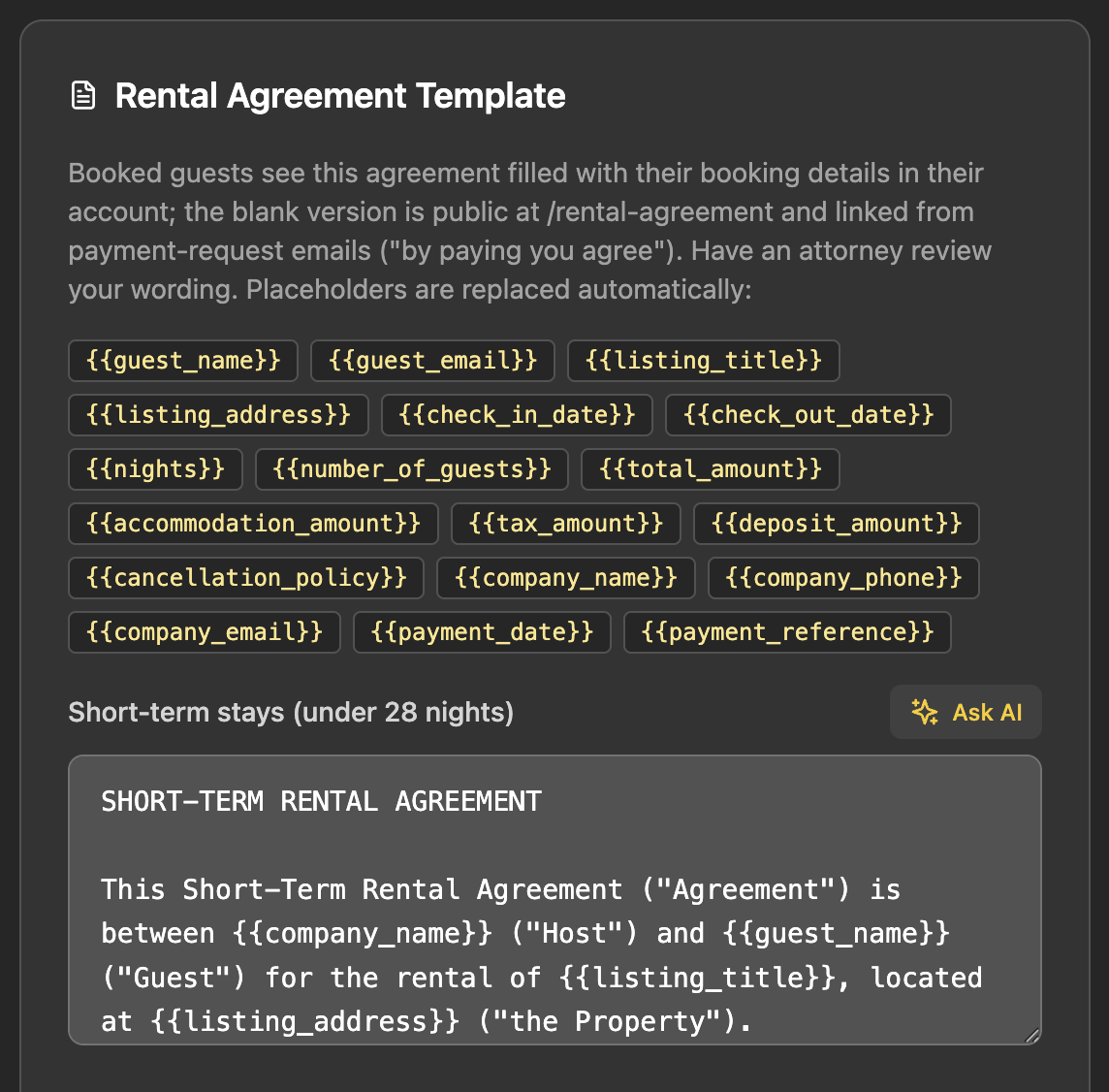
Bookings of 28 nights or more use the long-term version. If you leave the long-term box empty, they use the short-term one.
Always fill the short-term box. The guest's account looks at the short-term box to decide whether to show the agreement at all. If only the long-term box has text, guests see no agreement.
Write it with placeholders
Type or paste your agreement, and put a placeholder wherever a booking detail belongs. Placeholders use double curly braces, like {{guest_name}}. Spelling has to be exact.
| Placeholder | Filled with |
|---|---|
{{guest_name}} {{guest_email}} | The guest's account details |
{{listing_title}} | The listing's title |
{{listing_address}} | The private street address if you entered one, otherwise the public address |
{{check_in_date}} {{check_out_date}} | Written out, for example March 4, 2027 |
{{nights}} {{number_of_guests}} | From the booking |
{{total_amount}} {{accommodation_amount}} {{tax_amount}} {{deposit_amount}} | From the booking, shown as $0.00 USD |
{{cancellation_policy}} | The Cancellation Policy text on the listing |
{{company_name}} {{company_phone}} {{company_email}} | Your company settings |
{{payment_date}} {{payment_reference}} | The date paid and the Stripe payment reference |
Anything RESRA cannot fill shows up as a blank line: ____. That covers a misspelled placeholder, a placeholder that does not exist, and a real one whose value is missing.
There is no placeholder for pets. Write your pet terms into the agreement as ordinary text.
How the guest accepts it
- You send a payment request. The email tells the guest that completing payment means agreeing to the rental agreement, and links to the public page at
/rental-agreementon your site. - The guest pays. Payment is the acceptance. There is no signature step and no checkbox.
- The confirmation email invites the guest to sign in to their account.
- On their stay, the guest clicks View Rental Agreement and sees the agreement filled with their own booking. From there they can use Download PDF or Print.
The public page is mostly blanks, on purpose
The page at /rental-agreement has no booking to draw from, so it fills only your company name, phone, email and a general cancellation policy. Everything else shows as ____, with a line telling guests that the blanks are completed with their booking details. It always shows the short-term version.
That general cancellation policy comes from Cancellation Policy (company-wide), under Admin › Company › Booking Defaults. Booked guests see their own listing's policy instead.
Checklist so no clause is blank
- The short-term template is saved.
- The company-wide cancellation policy is filled in under Booking Defaults.
- Company name, phone and email are filled in under Admin › Company.
- Every listing has its Cancellation Policy text filled in, in the listing form.
- Each booking has the guest's email, the number of guests, and the amounts.
To check your work, open a paid test booking as the guest and read the agreement from top to bottom looking for ____.
The agreement is live, not frozen. RESRA builds each guest's copy at the moment they open it. If you edit the template, or change a booking's dates or price, the copies of guests who already booked change too. If you need a record of exactly what a guest agreed to, download the PDF when they pay and keep it.
RESRA gives you the mechanism, not the legal wording. Have an attorney review your agreement.
Related: Deposits and tax · Handle a booking request · Guest FAQ
Still stuck? Email us.